Slide 1 of 8
Slide 1 - AI Implementation – Team Beyond Limits
AI Implementation – Team Beyond Limits
From “Code Monkeys” to “AI Architects” – 24th April 2026
---
Photo by Declan Sun on Unsplash
Generated from prompt:
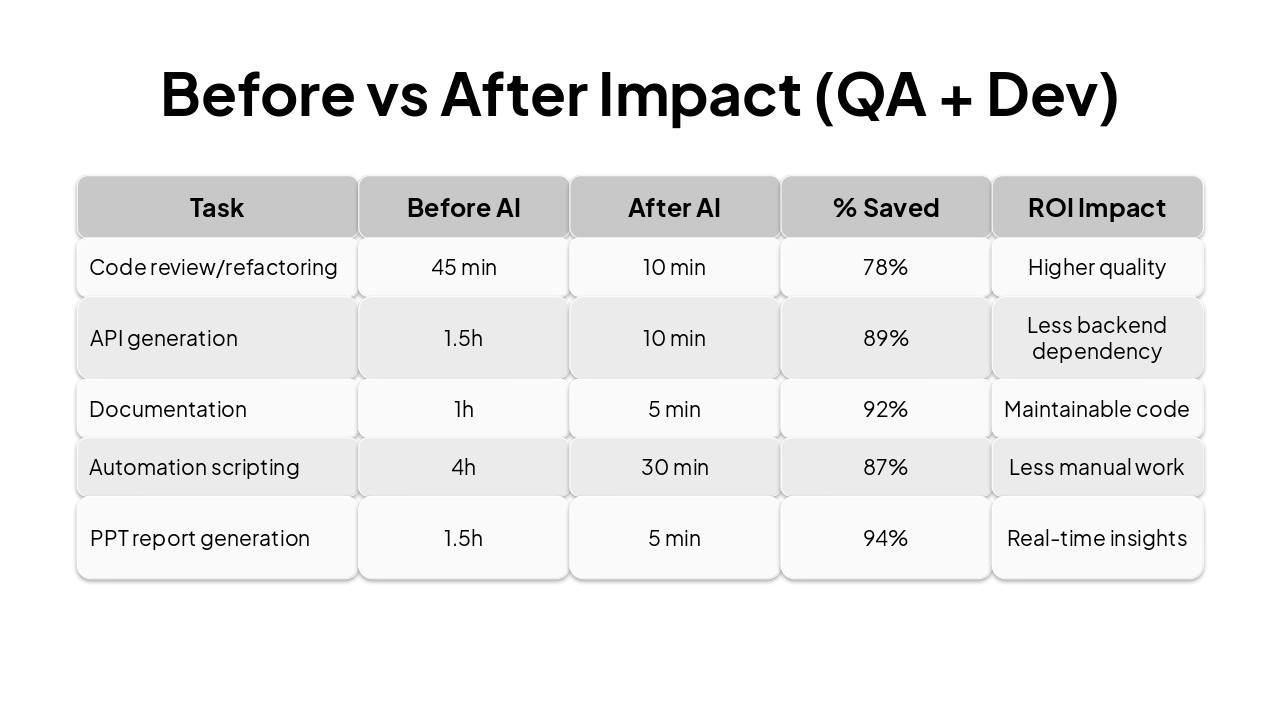
#### Slide 1 – Title Slide **Title:** AI Implementation – Team Name :Beyond Limits **Subtitle:** From “Code Monkeys” to “AI Architects” – 24th April 2026 **Bullet points:** Team: Subhra (PM), Papul (QA), Gaurab/Amit/Sagnik(React Native)Rinabrata (React Native & iOS Dev) (React Native), Shreyasi (Python), Suman/Subhamoy/Mayank (Node JS), Soumya/Arindam (React JS) Two solutions: AI‑integrated QA + Dev workflow (using external AI tools) - Three platforms built by us: 1. Multilingual voice tester 2.CodeCanvas **Visual:** Blue/grey gradient + icons --- #### Slide 2 – External AI Tools We Use Daily (Updated) **Title:** External AI Tools We Use Every Day (Our RAG is custom‑built) | AI Tool | Why I chose this | Why NOT alternatives | |---------|------------------|----------------------| | **Codex** | Complex coding logic and refactoring | Gemini: weak multi‑file reasoning | | **ChatGPT** | Best for research, development, and learning new frameworks | Claude: slower iteration for UI code | | **Copilot** | Real‑time inline suggestions inside IDE | CodeWhisperer: less accurate for frontend | | **DeepSeek** | Research, documentation creation, and technical summaries | Perplexity: less depth for architecture | | **Cursor** | Automation script writing (QA) | Copilot: weaker context for test flows | | **Kimi.ai** | Generates PPT reports from execution logs | Gamma: no direct log ingestion | **Antigravity** | Generates APIs & suggests precise, context‑aware code changes | Tabnine: only basic code completion | **Visual instruction:** - Clean table, alternating blue/grey rows, icons per tool --- Here's the **merged and updated slide** combining your original "Before vs After Impact" table with the positive and negative points of using AI in software development. --- #### Slide 3 – Before vs After Impact (Combined QA + Dev) + AI Adoption Pros & Cons **Impact Table** | Task | Before AI | After AI | % Saved | ROI Impact | |------|-----------|----------|---------|-------------| | Code review & refactoring (Codex) | 45 min | 10 min | 78% | Higher quality | | API generation (Antigravity) | 1.5h | 10 min | 89% | Less backend dependency | | Documentation (ChatGPT + DeepSeek) | 1h | 5 min | 92% | Maintainable code | | Automation script writing (Cursor) | 4h | 30 min | 87% | Less manual work | | PPT report generation (Kimi.ai) | 1.5h | 5 min | 94% | Real‑time insights | **Visual suggestion:** Bar charts, green checkmarks for time saved. --- ### ✅ Positive Points of Using AI | # | Benefit | |---|---------| | 1 | Less time, more work | | 2 | Complex code developed in less time | | 3 | Using machine's intelligence | | 4 | Maintain code structure | | 5 | Less human error | | 6 | Faster debugging & automated testing | ### ❌ Negative Points of Using AI | # | Drawback | |---|----------| | 1 | Skill loss over time | | 2 | Developers lack understanding of AI‑generated code despite it being implemented | | 3 | Overconfidence in AI output without proper review | | 4 | Security & compliance risks | --- **Key takeaway for the slide:** AI delivers **significant time savings (78–94%)** but must be adopted with **awareness of skill erosion, knowledge gaps, and security risks**. --- #### Slide 4 – Project 1: Multilingual Voice Tester **Simple workflow (Mermaid):** ```mermaid graph LR A[Teacher uploads PPT] --> B[Student asks in Hindi/Bengali] B --> C[Whisper → English text] C --> D[OpenAI model fixes technical terms] D --> E[**Our RAG** searches PPT] E --> F[Answer generated from PPT] F --> G[Spoken reply in student's language] ``` **Key points:** - No English needed from student - Answer always from today’s PPT Content - Supports Hindi, Bengali, Hinglish, English **Visual:** Blue background, microphone/document icons --- #### Slide 5 – Project 2: CodeCanvas **Simple workflow:** ```mermaid graph LR A[User writes code] --> B{Run} B -->|HTML/React/Vue| C[Instant browser preview] B -->|Python/Java/C++/C / PHP etc. D --> E[Output + errors] C --> F[Live result] E --> F ``` **Key features:** - 20+ languages, no local setup - AI demo mode: natural language → auto‑typed lesson - Used for learning, interviews, prototyping **Visual:** Grey background, code & Docker icons #### Slide 6 – Closing + Call to Action + Thank You **Thank you – Beyond Limits** **Q&A** **Visual:** Big bold numbers, blue “Next steps” box, team photo --- **Final notes for Kimi:** - Mermaid syntax inside markdown fenced blocks - Corporate colours: blue (#1E3A8A) and grey (#6B7280) - Animation: “appear one by one” This fully reflects the external AI tools your team uses daily in development, QA, documentation, and reporting. ""
Explore how our team transformed from 'Code Monkeys' to 'AI Architects' by integrating external AI tools into QA and Dev workflows. Covers team overview, daily AI tools, dramatic time savings (up to 94%), pros/cons of AI adoption, and workflows for '
AI Implementation – Team Beyond Limits
From “Code Monkeys” to “AI Architects” – 24th April 2026
---
Photo by Declan Sun on Unsplash
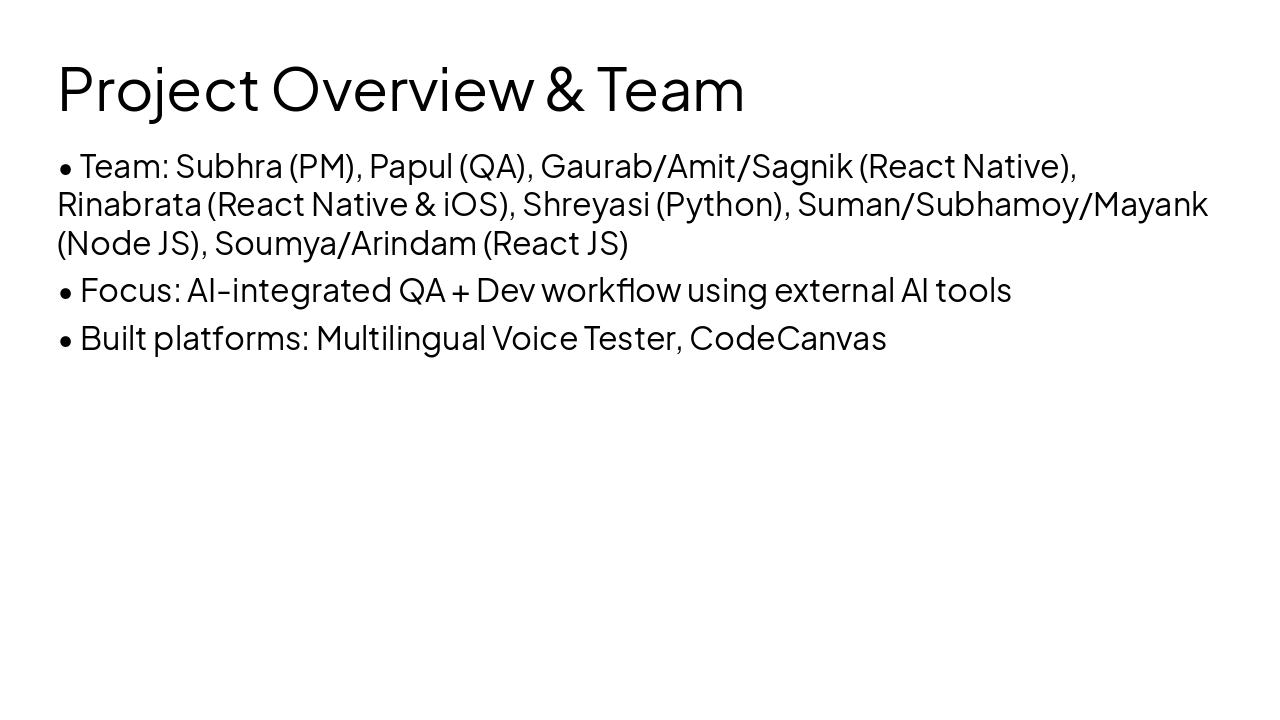
| AI Tool | Why I chose this | Why NOT alternatives |
|---|---|---|
| Codex | Complex coding logic and refactoring | Gemini: weak multi-file reasoning |
| ChatGPT | Best for research/dev/learning | Claude: slower iteration for UI |
| Copilot | Real-time IDE suggestions | CodeWhisperer: inaccurate frontend |
| DeepSeek | Research & documentation | Perplexity: less architecture depth |
| Cursor | Automation script writing (QA) | Copilot: weaker test flow context |
| Kimi.ai | PPT generation from logs | Gamma: no log ingestion |
| Antigravity | API generation & refactoring | Tabnine: basic completion only |
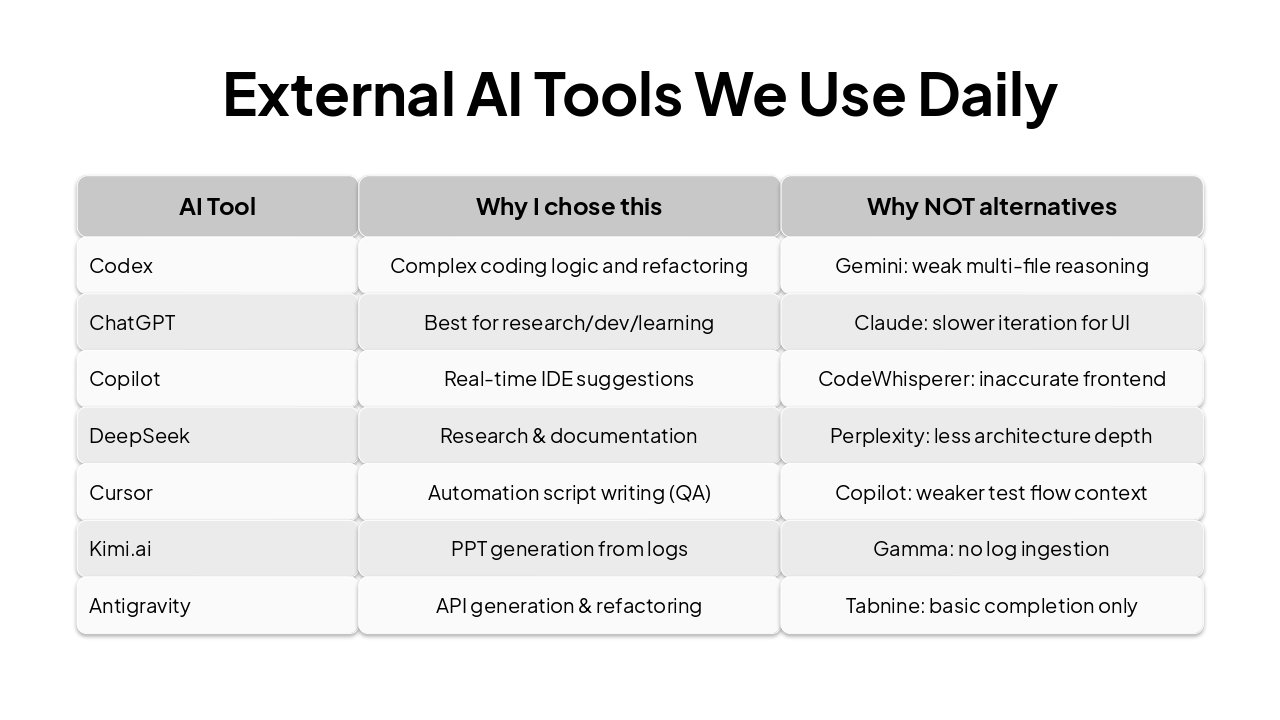
| Task | Before AI | After AI | % Saved | ROI Impact |
|---|---|---|---|---|
| Code review/refactoring | 45 min | 10 min | 78% | Higher quality |
| API generation | 1.5h | 10 min | 89% | Less backend dependency |
| Documentation | 1h | 5 min | 92% | Maintainable code |
| Automation scripting | 4h | 30 min | 87% | Less manual work |
| PPT report generation | 1.5h | 5 min | 94% | Real-time insights |
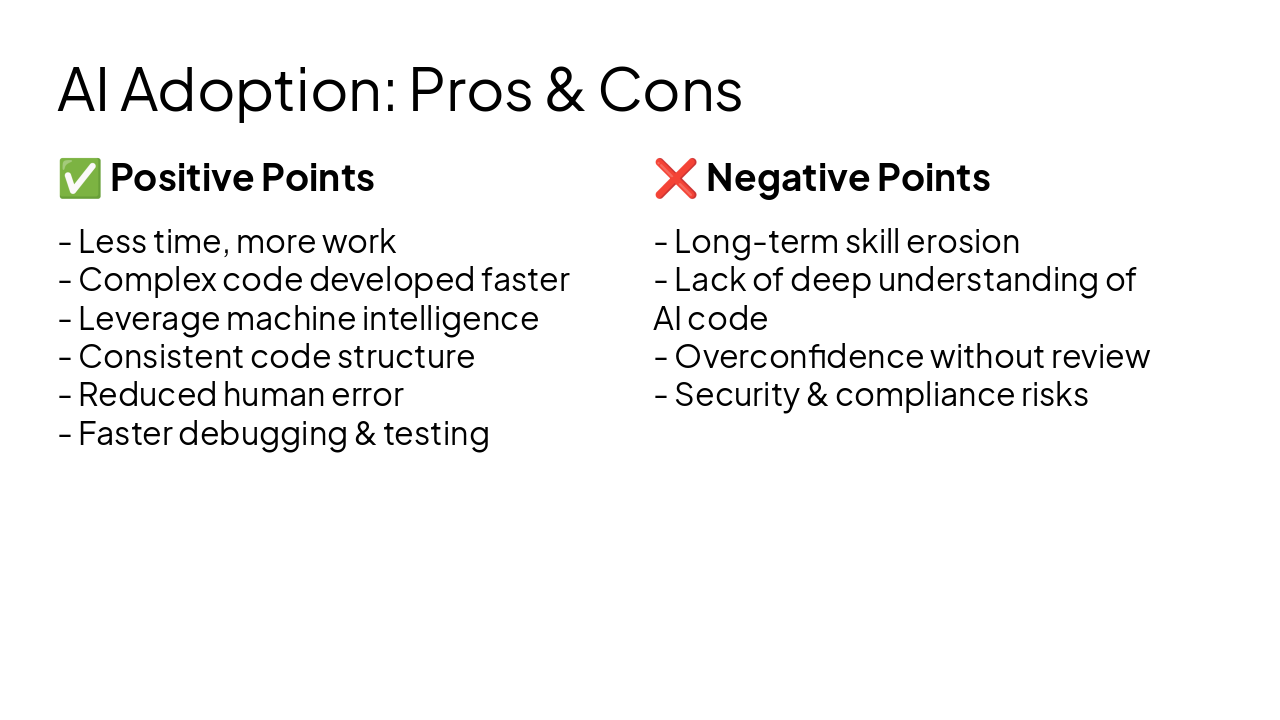
✅ Positive Points
❌ Negative Points
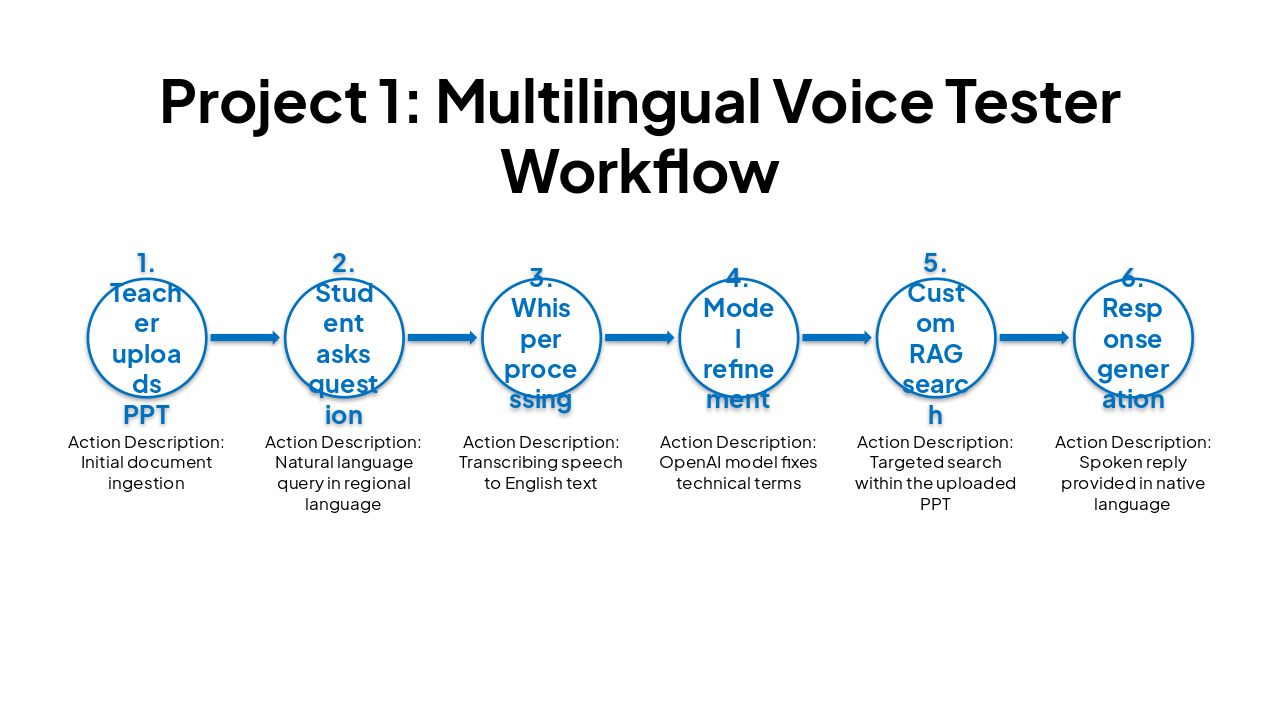
| Workflow Step | Action Description |
|---|---|
| 1. Teacher uploads PPT | Initial document ingestion |
| 2. Student asks question | Natural language query in regional language |
| 3. Whisper processing | Transcribing speech to English text |
| 4. Model refinement | OpenAI model fixes technical terms |
| 5. Custom RAG search | Targeted search within the uploaded PPT |
| 6. Response generation | Spoken reply provided in native language |
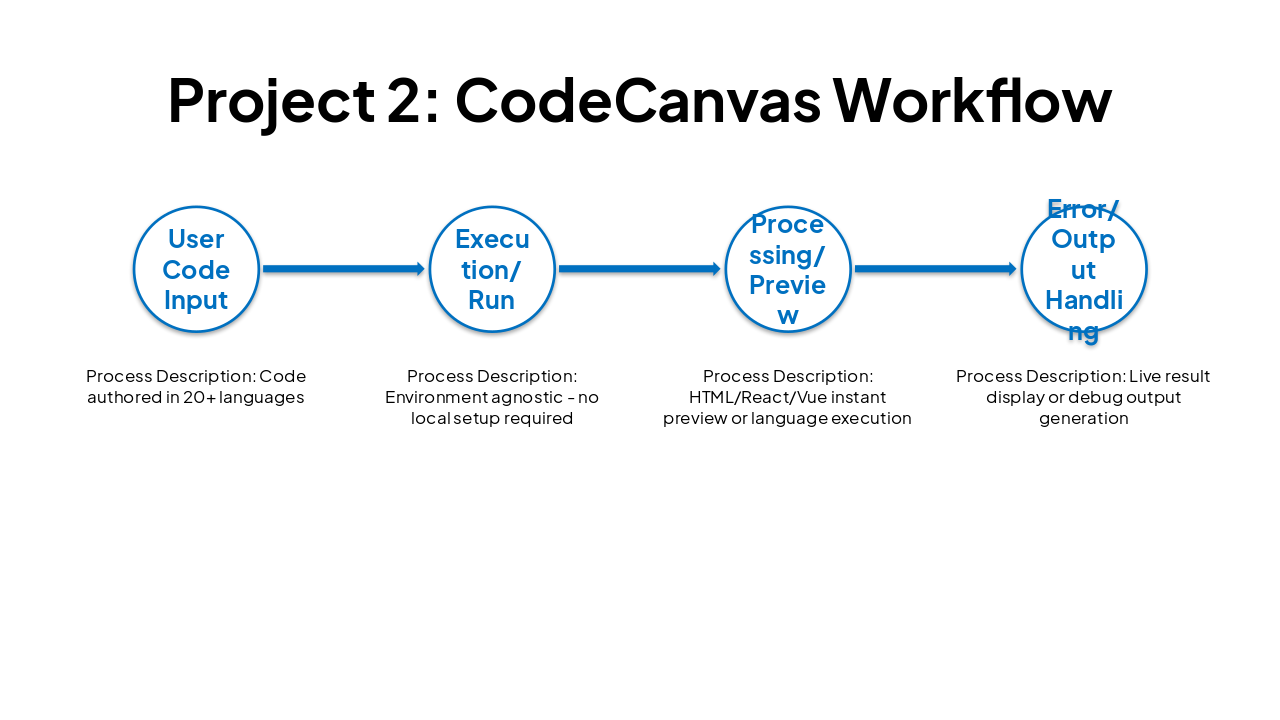
| Workflow Stage | Process Description |
|---|---|
| User Code Input | Code authored in 20+ languages |
| Execution/Run | Environment agnostic - no local setup required |
| Processing/Preview | HTML/React/Vue instant preview or language execution |
| Error/Output Handling | Live result display or debug output generation |
Beyond Limits – AI-Driven Development and QA
Thank you for your time. Any questions?
Explore thousands of AI-generated presentations for inspiration
Generate professional presentations in seconds with Karaf's AI. Customize this presentation or start from scratch.