Modernizing Plydot: Dynamic Upgrades & 2FA Integration

Generated from prompt:

Professional presentation titled 'Modernizing Plydot: Dynamic Infrastructure & Developer Experience'. Focus: translating technical upgrades into business value and system strategy. Audience: Product Managers, Stakeholders, Dev Team. Duration: 5-7 minutes. Slide 1: Title — 'Frontend Architecture Upgrade & SMS 2FA Service Integration'; Subtitle: 'Delivering User Stories 253 & 232'; Presenter: Wejuli Nathan; Context: Eirra / Plydot Business Website. Slide 2: The Challenge — Static content bottlenecks, fragmented developer experience (2FA tool in separate repo), and brand inconsistency with 'Eirra Industrial Dark'. Slide 3: Strategic Solution — From Static to Dynamic (US-253: REST API Integration), From Isolated to Integrated (US-232: 2FA Testing Service Migration), From Generic to Branded (Dark Monochrome UI overhaul). Slide 4: Feature Showcase - API Integration — Real-time CMS updates, TypeScript type safety, SSR optimization for performance. Slide 5: Feature Showcase - SMS 2FA Demo — Try-before-you-buy experience, microservice routing, enhanced UX with modal feedback. Slide 6: Visual Polish & Brand Alignment — Transition to 'Kotlis Look' with dark mode, enterprise-grade polish, restored design consistency. Slide 7: Live Demonstration — Walkthrough of API integration, 2FA flow, and visual details. Slide 8: Business Value — Operational efficiency, faster sales conversion, stronger brand trust. Slide 9: Recommendations & Next Steps — Move to production, CMS content population, analytics tracking for 2FA demo engagement.

This presentation outlines upgrading Plydot's frontend from static to dynamic architecture, integrating SMS 2FA services, and aligning with brand visuals. It addresses challenges like content bottlene

November 26, 20259 slides
Slide 1 of 9

Slide 1 - Frontend Architecture Upgrade & SMS 2FA Service Integration

Frontend Architecture Upgrade & SMS 2FA Service Integration

Delivering User Stories 253 & 232

Presenter: Wejuli Nathan Context: Eirra / Plydot Business Website

Slide 1 - Frontend Architecture Upgrade & SMS 2FA Service Integration
Slide 2 of 9

Slide 2 - The Challenge

  • Static content via hardcoded JSON required dev commits for updates
  • SMS 2FA tool in separate Flyte repo hindered client discovery
  • UI with Blue/Orange accents clashed with Eirra Industrial Dark brand
Slide 2 - The Challenge
Slide 3 of 9

Slide 3 - Strategic Solution (The "Why")

  • From Static to Dynamic (US-253): Integrated full REST API to decouple content from engineering cycles.
  • From Isolated to Integrated (US-232): Migrated 2FA to website, reducing developer barrier for SMS API.
  • From Generic to Branded: Applied 'Dark Monochrome' UI overhaul to build trust via professional design.
Slide 3 - Strategic Solution (The "Why")
Slide 4 of 9

Slide 4 - Feature Showcase - API Integration

  • Real-Time Data: Live fetching on Home, Eirra, Funderr, Support pages
  • Instant CMS Updates: Marketing edits copy/images without engineering
  • TypeScript Interfaces: Replaced loose JSON for strict reliability
  • Reduced Errors: Fewer runtime issues and 'undefined' glitches
  • SSR Optimization: Fixed CSS injection errors in Docker
  • Faster Loads: Improved SEO, performance, and cleaner logs
Slide 4 - Feature Showcase - API Integration
Slide 5 of 9

Slide 5 - Feature Showcase - SMS 2FA Demo

  • 'Try Before You Buy': 2FA Demo button on Hero section.
  • Seamless Routing: Proxy CMS → Main API, 2FA → SMS Microservice.
  • Enhanced UX: Secure overlay Modal.
  • Visual Feedback: Loading, success checks, error handling.
  • Value: Validate API in under 30 seconds.
Slide 5 - Feature Showcase - SMS 2FA Demo
Slide 6 of 9

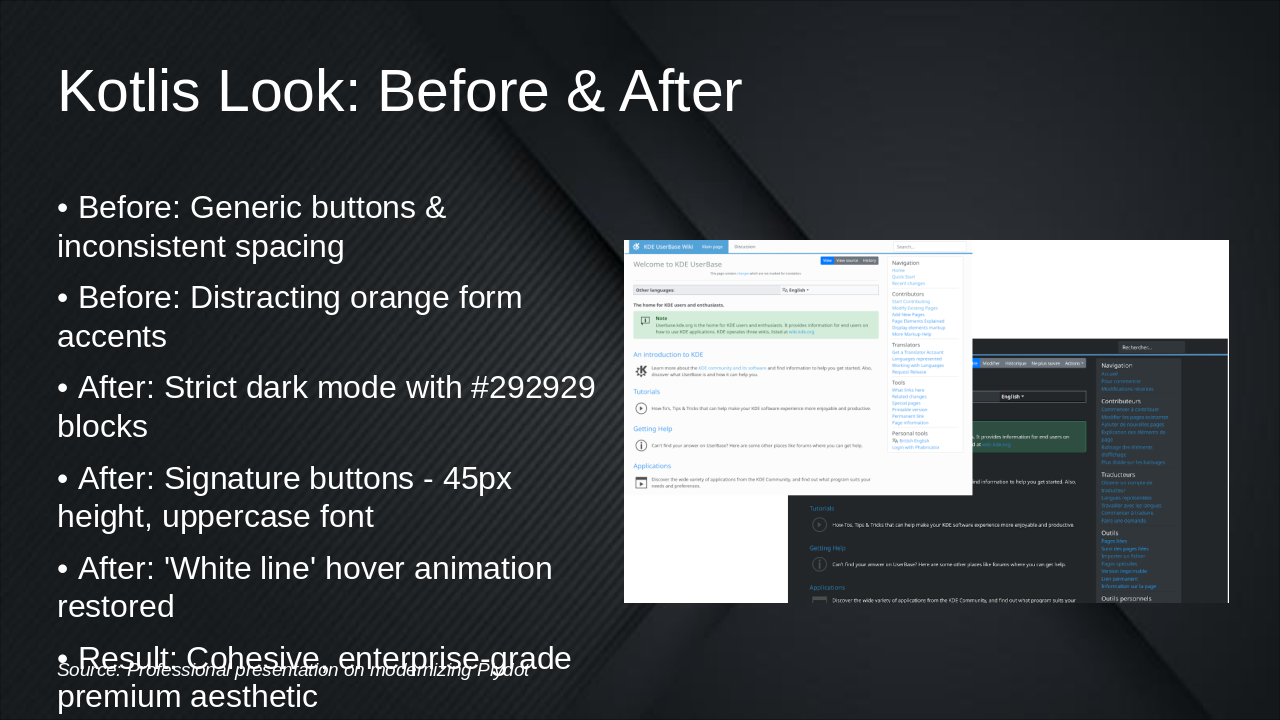
Slide 6 - Kotlis Look: Before & After

  • Before: Generic buttons & inconsistent spacing
  • Before: Distracting orange form accents
  • After: Strict dark mode with #292929 blocks
  • After: Signature buttons - 45px height, uppercase font
  • After: 'White line' hover animation restored
  • Result: Cohesive, enterprise-grade premium aesthetic
Slide 6 - Kotlis Look: Before & After
Slide 7 of 9

Slide 7 - Live Demonstration

  • Navigate pages to demo API integration
  • Highlight server-loaded images/text (network tab)
  • Click 'Try 2FA Demo' to start flow
  • Enter phone number; show 'Sending...' state
  • Input OTP; display 'Verified' success
  • Emphasize modal's visual quality
Slide 7 - Live Demonstration
Slide 8 of 9

Slide 8 - Business Value

  • Operational Efficiency: Reduces engineering overhead by eliminating static content copy-pasting.
  • Sales Conversion: Front-and-center 2FA demo shortens API integration sales cycle.
  • Brand Integrity: Consistent, bug-free UI builds client trust in security.
Slide 8 - Business Value
Slide 9 of 9

Slide 9 - Recommendations & Next Steps

• Move to production: Docker/Proxy ready for live environment

  • Populate CMS: Marketing verifies data for dynamic fields
  • Track 'Try 2FA Demo' button for interest and conversions

Transforming technical upgrades into lasting business impact.

Slide 9 - Recommendations & Next Steps

Discover More Presentations

Explore thousands of AI-generated presentations for inspiration

Browse Presentations
Powered by AI

Create Your Own Presentation

Generate professional presentations in seconds with Karaf's AI. Customize this presentation or start from scratch.

Create New Presentation

Powered by Karaf.ai — AI-Powered Presentation Generator