Why Production Missed Full Capacity

Generated from prompt:

Create a PowerPoint presentation using exactly the provided text for all 18 slides. Title: Executive Problem Statement – Why Our Production System Did Not Reach Full Capacity. Keep all wording identical and preserve emojis and bullet formatting. Do not rewrite or shorten content. The presentation should include: Slide 1: Title Slide – Executive Problem Statement – Why Our Production System Did Not Reach Full Capacity, Internal Review Meeting, [Name, Title, Date], Optional company logo. Slide 2: Meeting Purpose – as written. Slide 3: Agenda – as written. Slide 4: Annual Objectives – as written. Slide 5: Problem Categories – table as written. Slide 6: Production Flow Diagram – CAM ➜ CNC ➜ Assembly & Finishing ➜ QC, callouts as written. Slides 7–14: Each problem area exactly as provided, preserving emojis and formatting. Slide 15: Summary of System Behavior – as written. Slide 16: What This Meeting Isn’t – as written. Slide 17: What Comes Next – as written. Slide 18: Alignment Question – as written.

Executive review uncovers bottlenecks in CAM, CNC, Assembly, QC workflow preventing 100% capacity. Details objectives, problem categories, key issues, and next steps for alignment.

December 19, 20256 slides
Slide 1 of 6

Slide 1 - Executive Problem Statement

This title slide, named "Executive Problem Statement," features the main text: "Why Our Production System Did Not Reach Full Capacity." The subtitle specifies it is for an "Internal Review Meeting" with placeholders for [Name, Title, Date].

Why Our Production System Did Not Reach Full Capacity

Internal Review Meeting [Name, Title, Date]

Source: Internal Review Meeting

Slide 1 - Executive Problem Statement
Slide 2 of 6

Slide 2 - Meeting Purpose

The meeting reviews reasons production missed full capacity and identifies key issues blocking output. It defines a clear executive problem statement and aligns on root causes and impacts.

Meeting Purpose

  • Review reasons production missed full capacity
  • Identify key issues blocking output
  • Define clear executive problem statement
  • Align on root causes and impacts
Slide 2 - Meeting Purpose
Slide 3 of 6

Slide 3 - Agenda

The agenda slide outlines four main sections: Introduction and Objectives (meeting purpose, agenda, and annual goals), Production System Overview (flow diagram and problem categories), Detailed Problem Areas (examination of production bottlenecks), and Summary and Next Steps (system behavior, meeting scope, and future actions). This structure guides the discussion on production issues and action plans.

Agenda

  1. Introduction and Objectives
  2. Meeting purpose, agenda, and annual objectives.

  3. Production System Overview
  4. Flow diagram and problem categories table.

  5. Detailed Problem Areas
  6. Examination of each production bottleneck.

  7. Summary and Next Steps
  8. System behavior, meeting scope, and future actions.

Slide 3 - Agenda
Slide 4 of 6

Slide 4 - Annual Objectives

The slide lists key annual objectives for production, including achieving 100% capacity utilization, increasing output to target volume, and minimizing unplanned downtime below 5%. It also targets 98% on-time delivery performance and a 20% boost in overall system efficiency.

Annual Objectives

  • Achieve 100% production capacity utilization.
  • Increase annual output to target volume.
  • Minimize unplanned downtime below 5%.
  • Ensure 98% on-time delivery performance.
  • Boost overall system efficiency by 20%.
Slide 4 - Annual Objectives
Slide 5 of 6

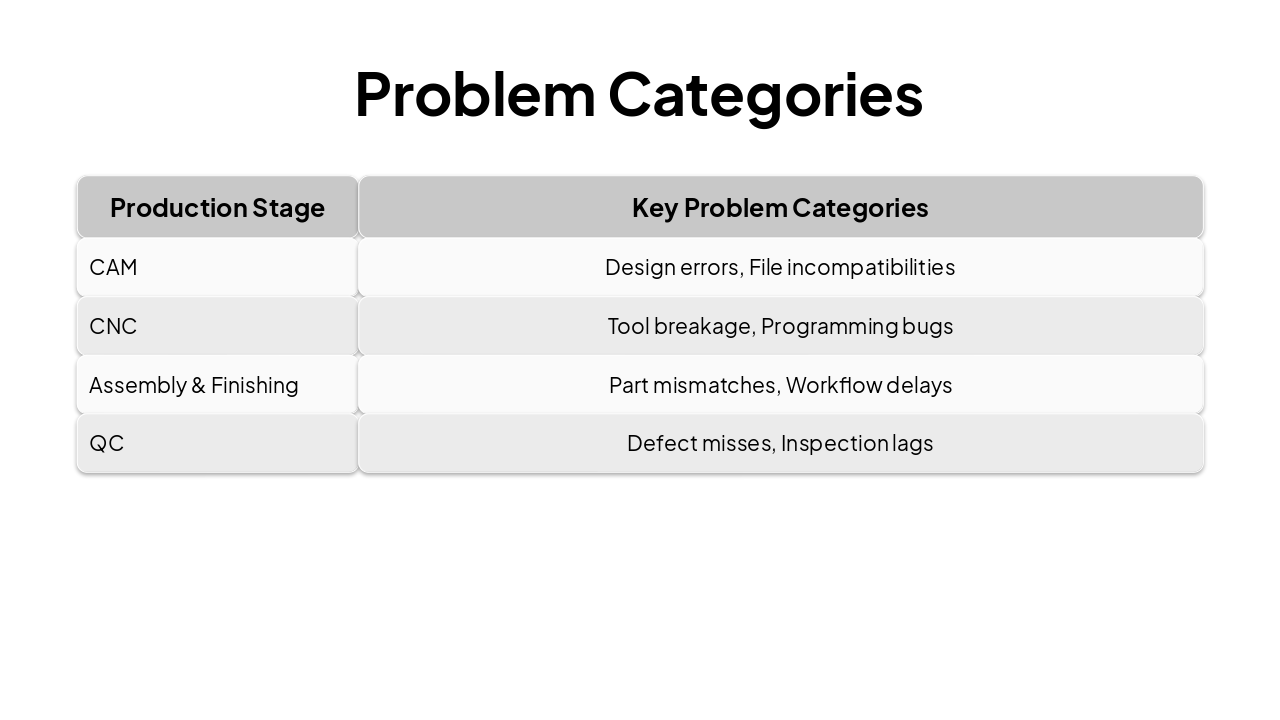
Slide 5 - Problem Categories

The slide features a table titled "Problem Categories" listing key issues by production stage. It covers CAM (design errors, file incompatibilities), CNC (tool breakage, programming bugs), Assembly & Finishing (part mismatches, workflow delays), and QC (defect misses, inspection lags).

Problem Categories

{ "headers": [ "Production Stage", "Key Problem Categories" ], "rows": [ [ "CAM", "Design errors, File incompatibilities" ], [ "CNC", "Tool breakage, Programming bugs" ], [ "Assembly & Finishing", "Part mismatches, Workflow delays" ], [ "QC", "Defect misses, Inspection lags" ] ] }

Slide 5 - Problem Categories
Slide 6 of 6

Slide 6 - Production Flow Diagram

The Production Flow Diagram outlines four phases of the workflow: CAM (Design Team, 1 day), CNC (Machining Team, 2 days), Assembly & Finishing (Assembly Team, 3 days), and QC (Quality Team, 1 day). It uses a table format with columns for Phase, Owner, and Duration.

Production Flow Diagram

{ "headers": [ "Phase", "Owner", "Duration" ], "rows": [ [ "CAM", "Design Team", "1 day" ], [ "CNC", "Machining Team", "2 days" ], [ "Assembly & Finishing", "Assembly Team", "3 days" ], [ "QC", "Quality Team", "1 day" ] ] }

Slide 6 - Production Flow Diagram

Discover More Presentations

Explore thousands of AI-generated presentations for inspiration

Browse Presentations
Powered by AI

Create Your Own Presentation

Generate professional presentations in seconds with Karaf's AI. Customize this presentation or start from scratch.

Create New Presentation

Powered by Karaf.ai — AI-Powered Presentation Generator