基于数据库的选课系统设计与实现

Generated from prompt:

基于数据库的选课系统设计与实现 汇报型风格 幻灯片 1: 封面页 标题: 基于数据库的选课系统设计与实现 副标题: 项目架构、核心流程与成果汇报 汇报人: (您的姓名) 日期: (汇报日期) 幻灯片 2: 项目概述 标题: 项目概述:挑战与目标 核心目标: 设计并实现一个支持复杂业务规则、安全可靠的在线课程选择系统。 关键业务约束: 1. 先修课程: 学生必须先修完指定课程,才能选择更高级的课程。 2. 学分上限: 单个学期内,学生所选课程的总学分不得超过21分。 3. 时间冲突: 学生所选的多门课程之间,上课时间不允许有任何重叠。 技术栈: 后端 Spring Boot + MyBatis + Spring Security + JWT;前端 Vue.js + Element Plus;数据库 MySQL。 幻灯片 3: 系统架构设计 标题: 系统架构:清晰的三层分离模式 内容: 前端(Vue.js)、后端(Spring Boot)、数据库(MySQL)三层分离架构,数据流清晰,职责明确。 视觉: 三层架构图 幻灯片 4: 后端架构详解 标题: 后端架构:高内聚、低耦合的分层设计 内容: MVC分层结构,Controller负责请求接收,Service负责业务逻辑,Mapper负责数据访问。 视觉: 自上而下垂直堆叠的分层图 幻灯片 5: 核心流程 (1) - JWT安全认证流程 标题: 核心流程 (1) - JWT安全认证流程 内容: 登录生成JWT;前端携带JWT访问接口;后端验证JWT有效性。 视觉: 用户、前端、后端交互的时序图。 幻灯片 6: 数据库设计 - 总体思想与E-R图 标题: 数据库设计:支撑复杂业务的核心 内容: 采用实体-关系分离设计,核心实体 students, courses, enrollments, prerequisites, student_transcripts。 视觉: E-R图。 幻灯片 7-11: 数据表详解 分别介绍 students、courses、enrollments、prerequisites、student_transcripts 表的字段及作用。 幻灯片 12: 核心流程 (2) - 选课校验流程 标题: 核心流程 (2) - 选课校验流程 内容: 按“先修课程→学分上限→时间冲突→插入选课记录→更新课程人数”流程执行。 视觉: 校验流程图。 幻灯片 13: 系统功能演示 标题: 系统功能演示 内容: 登录页面、课程列表、选课失败与成功提示、“我的课程”截图展示。 视觉: 截图及箭头标注。 幻灯片 14: 总结与展望 标题: 总结与展望 内容: 系统完成度高、安全稳定;未来扩展教师/管理员角色、性能优化、用户体验提升。 幻灯片 15: end 标题: 谢谢观看,敬请提问! 风格说明: 汇报型风格,简洁专业,标题明确,色调建议使用蓝白科技风,强调逻辑与结构清晰。

本汇报展示选课系统设计与实现,涵盖项目目标(支持先修、学分上限、时间冲突规则)、三层架构(Vue.js+Spring Boot+MySQL)、JWT认证与选课校验流程、数据库E-R图及表设计、功能演示及未来展望。系统安全稳定、高度完成。(128字)

December 12, 202515 slides
Slide 1 of 15

Slide 1 - Design and Implementation of Database-Based Course Selection System

Design and Implementation of Database-Based Course Selection System

Project Architecture, Core Workflow, and Achievements

Slide 1 - Design and Implementation of Database-Based Course Selection System
Slide 2 of 15

Slide 2 - Project Overview: Challenges and Goals

  • Core Goal: Secure, reliable online course system with complex rules
  • Key Constraint 1: Prerequisites – complete specified courses
  • Key Constraint 2: Credit Limit – semester total ≤21 credits
  • Key Constraint 3: No Time Conflicts – non-overlapping schedules
  • Tech Stack: Spring Boot+MyBatis+Security+JWT; Vue.js+Element; MySQL
Slide 2 - Project Overview: Challenges and Goals
Slide 3 of 15

Slide 3 - System Architecture: Clear Three-Tier Separation

  • Frontend Layer: Vue.js UI & Interactions
  • Backend Layer: Spring Boot Business Logic
  • Database Layer: MySQL Data Persistence
  • Clear Data Flow, Distinct Responsibilities
Slide 3 - System Architecture: Clear Three-Tier Separation
Slide 4 of 15

Slide 4 - Backend: High-Cohesion, Low-Coupling Layers

  • Controller: Receives HTTP requests, routes to Service.
  • Service: Handles core business logic, calls Mapper.
  • Mapper: Manages data access and persistence.
  • Vertical layers ensure high cohesion, low coupling.
Slide 4 - Backend: High-Cohesion, Low-Coupling Layers
Slide 5 of 15

Slide 5 - Core Workflow (1): JWT Authentication

Slide 5 - Core Workflow (1): JWT Authentication
Slide 6 of 15

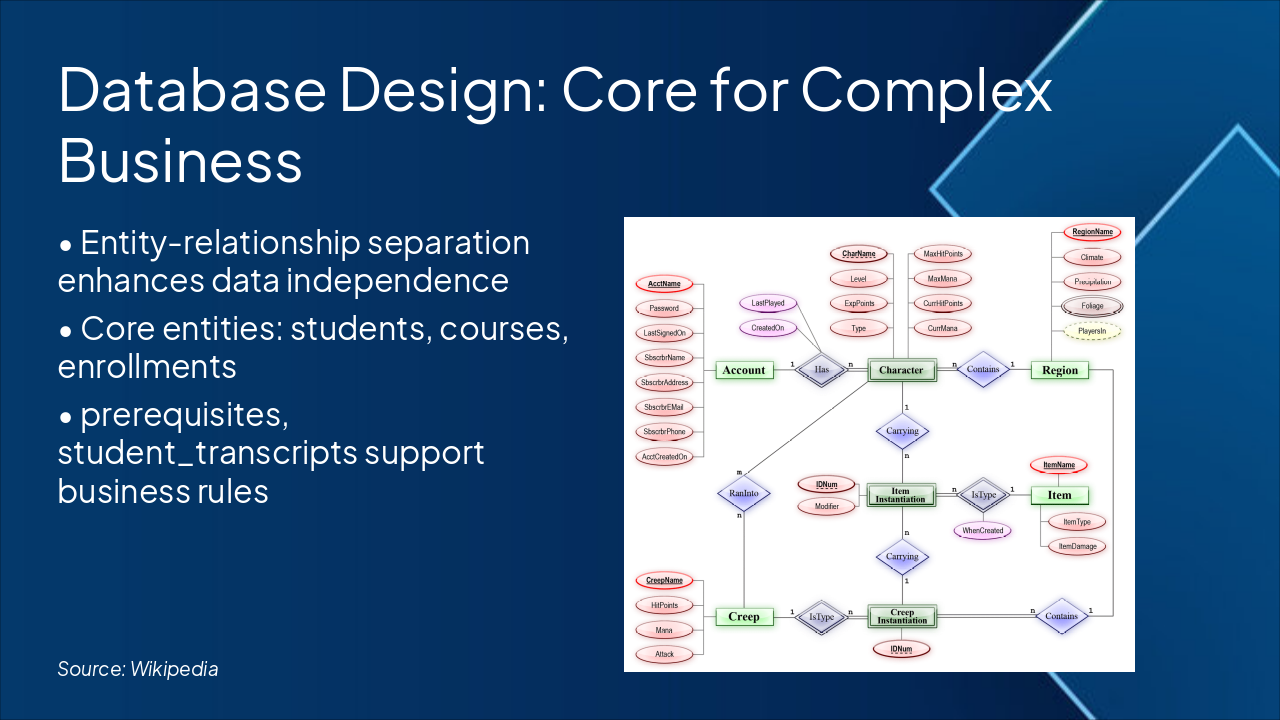
Slide 6 - Database Design: Core for Complex Business

  • Entity-relationship separation enhances data independence
  • Core entities: students, courses, enrollments
  • prerequisites, student_transcripts support business rules
Slide 6 - Database Design: Core for Complex Business
Slide 7 of 15

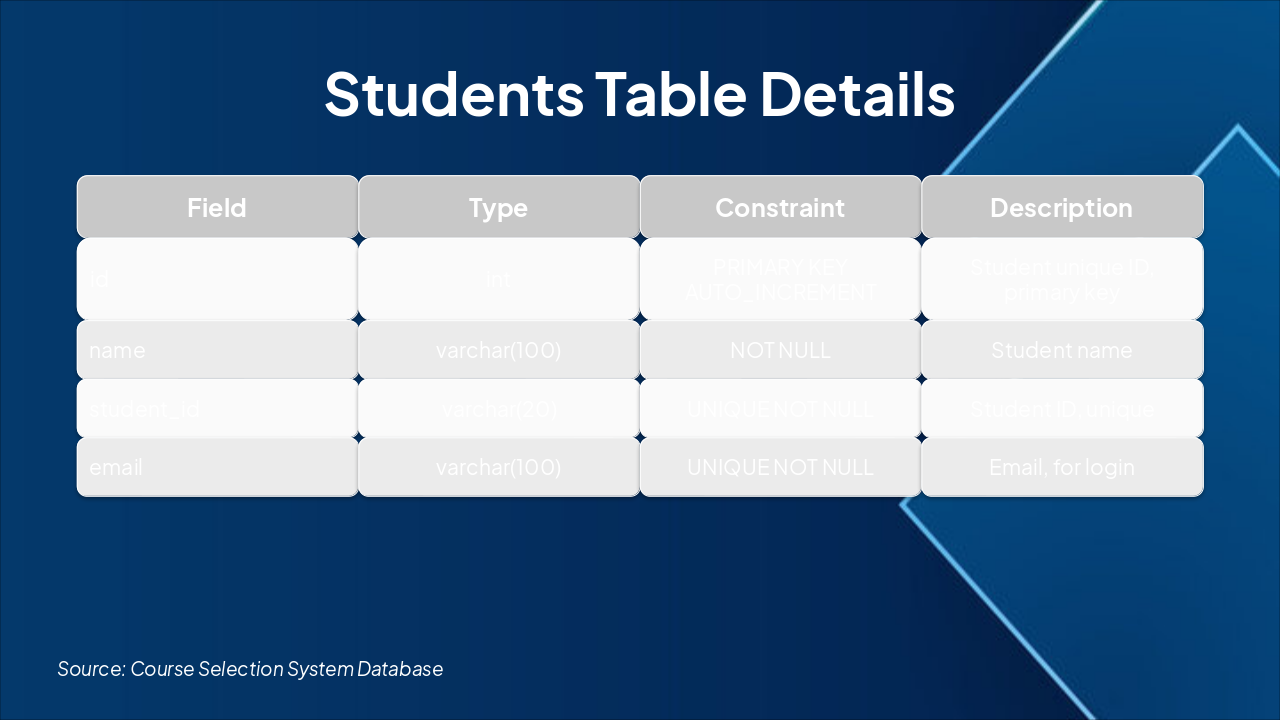
Slide 7 - Students Table Details

Slide 7 - Students Table Details
Slide 8 of 15

Slide 8 - Courses Table Details

Slide 8 - Courses Table Details
Slide 9 of 15

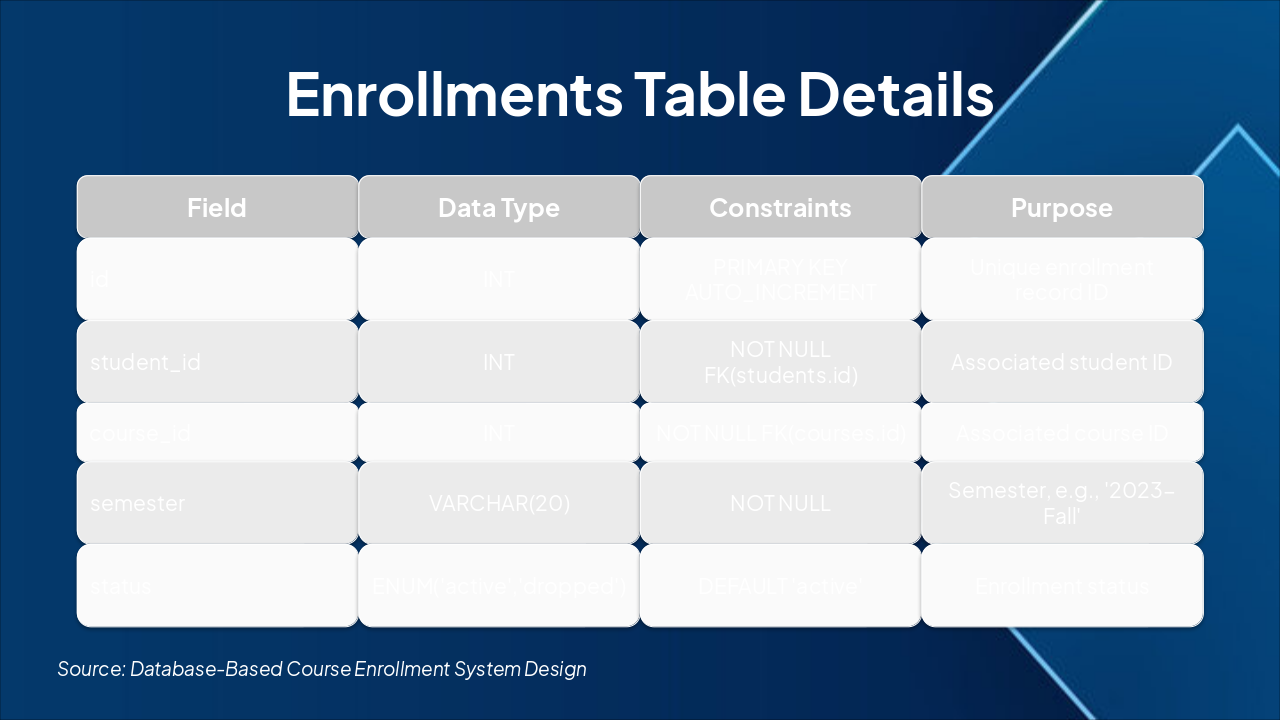
Slide 9 - Enrollments Table Details

Slide 9 - Enrollments Table Details
Slide 10 of 15

Slide 10 - Prerequisites Table Details

Slide 10 - Prerequisites Table Details
Slide 11 of 15

Slide 11 - student_transcripts Table Details

Slide 11 - student_transcripts Table Details
Slide 12 of 15

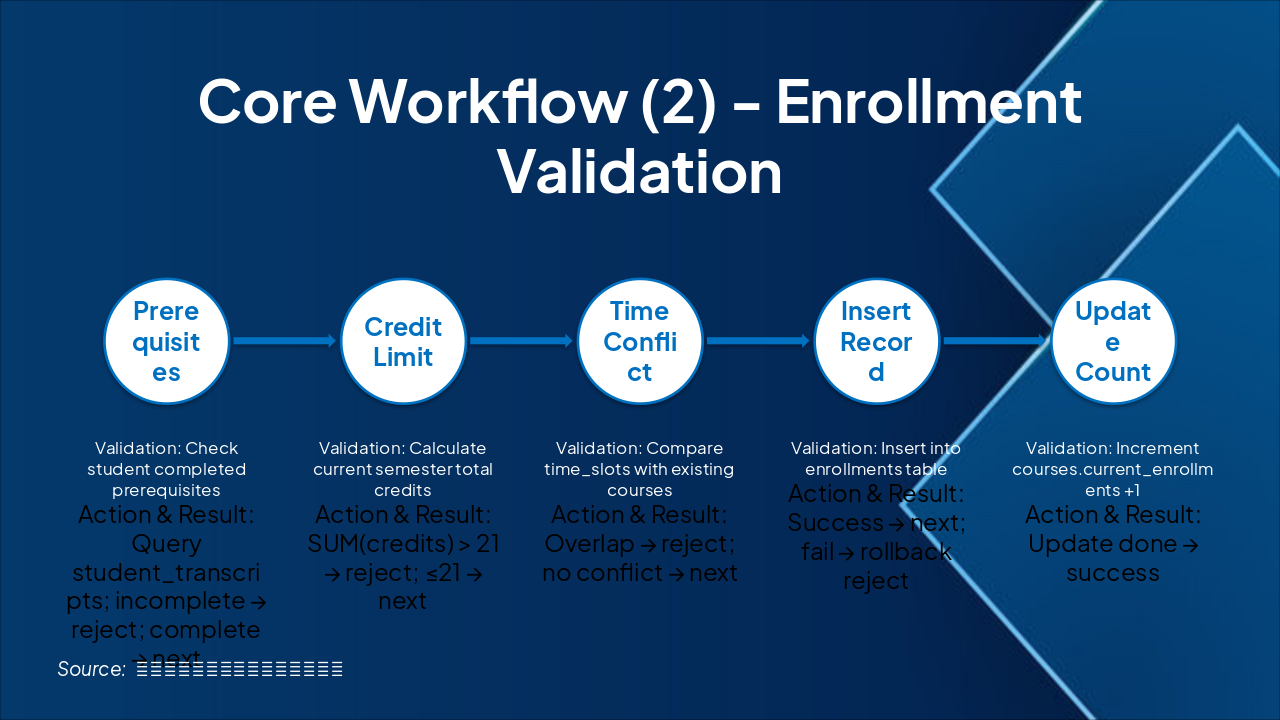
Slide 12 - Core Workflow (2) - Enrollment Validation

Slide 12 - Core Workflow (2) - Enrollment Validation
Slide 13 of 15

Slide 13 - System Features Demo

  • Login Page: Secure Account and Password Entry
  • Course List: Browse Available Course Details
  • Course Selection: Failure and Success Feedback
  • My Courses: View Selected Course Records
Slide 13 - System Features Demo
Slide 14 of 15

Slide 14 - Summary & Outlook

**Summary High completion, secure & stable. Core validation & authentication achieved.

Outlook

  • Expand teacher/admin roles
  • Performance optimization
  • Enhance UX**

Thank you! Questions welcome.

Slide 14 - Summary & Outlook
Slide 15 of 15

Slide 15 - Thank you! Any questions?

Thank you! Any questions?

Slide 15 - Thank you! Any questions?

Discover More Presentations

Explore thousands of AI-generated presentations for inspiration

Browse Presentations
Powered by AI

Create Your Own Presentation

Generate professional presentations in seconds with Karaf's AI. Customize this presentation or start from scratch.

Create New Presentation

Powered by Karaf.ai — AI-Powered Presentation Generator